
Interested in virtual office software?
Remote work is a whole different ball game compared to regular office work.
When you switch to virtual office space, you can’t just use the same tools as you did in the office. And, like any new team, your remote team is bound to face some challenges.
That’s exactly why you need virtual office software.
With a virtual office tool, you can ensure your team is working productively and creating the right virtual office environment.
But with hundreds of software available and several traditional office elements to mimic, what’s the best tool for your virtual company?
In this article, we’ll cover everything you need to know about virtual office software. We’ll highlight the top 10 software for your virtual office, along with their key features, pricing, and customer ratings.
This article contains:
(Click on the links below to go to a specific section)
- What is Virtual Office Software?
- Types of Virtual Office Software
- Why Your Team Needs Virtual Office Software
- Top 10 Virtual Office Software
Let’s get started.
What is virtual office software?
Virtual office software takes all the amazing things found in a physical office space online. With several features for screen sharing, video conferencing, and team collaboration, online office software helps teams tackle their tasks with ease.
It can also give your business both in-office and remote work perks. For example, you can use virtual mailbox software to give your company a virtual business address and phone number.
Types of virtual office software
Your team can’t just use video conferencing tools, like Skype or asynchronous communication apps like Microsoft Teams, and expect to become the most successful remote team.
That’s why you have different categories of virtual office software, each suiting different needs.
Here’s a quick look at the common types of virtual office software:
- Project management: Tracks project progress to ensure you complete tasks on time and achieve goals.
- Productivity management: Ensures your remote workers are doing their work by using time-tracking tools and productivity reports.
- Instant messaging: Gives every remote worker a platform where they can share quick feedback.
- Video conferencing: Allows team access to face-to-face communication through video chat.
- Team collaboration: Team members have a virtual co-working space to work together on projects in real-time.
- Cloud storage: Gives every employee a secure, centralized space to store data.
- Virtual workspace: Provides a virtual space for hybrid and remote teams to come together.
- Employee engagement: Recognizes and rewards employee efforts to increase team engagement.
- Online security: For your company’s privacy, security, and anonymity when employees are online.
- Mental Wellness: To help remote employees manage anxiety and stress.
Why your team needs virtual office software
Virtual office software gives a distributed team a greater sense of direction and belonging.
It also helps your remote team get the best virtual co-working experience possible.
Here’s a closer look at the key benefits of using virtual office software:
1. Face-to-face communication
Remote teams are sometimes distributed across the world, and it’s difficult to feel like a team, but with virtual office software, your team members will feel closer to their team.
How?
With virtual office software, your team has access to face-to-face communication via video conferencing.
Screen sharing also helps team members see each others’ computer screens. This way, team members can feel like they’re discussing a project side-by-side in a physical office.
Some virtual office software has non-work communication features. For example, built-in watercooler chat rooms where teams can hang out or engage in fun games for team bonding.
2. Attendance and time management
Time-tracking features and productivity reports give project managers a better perspective on their teams and which tasks they spend the most time on.
Moreover, knowing when every employee clocks in and clocks out means team members know when that person is available to collaborate on a project.
Time-tracking also keeps remote employees accountable. When employees are on the clock, they know they have to be productive.
3. Better collaboration
Built-in instant messaging chat rooms give team members a more personalized setting to communicate and collaborate.
Virtual office software also provides teams with ways to show their availability. This way, team members won’t disturb those that are in a virtual meeting room.
And those who are available can use powerful one-click conversations to collaborate across different time zones.
4. Clear work-life boundaries
Without a physical address or office to go to, remote working employees have fewer boundaries between their work-life and home life.
But how does a virtual office space help remote workers draw the line?
The answer lies in time-tracking and instant messaging apps.
These tools give teammates a way to enter and leave their home office. When they clock in, they’re in an office environment, and once they’ve clocked out, they’re home.
Top 10 virtual office software
Here are the top six virtual office software for different categories:
1. Time Doctor for productivity management

Time Doctor is the ultimate tool for employee time tracking and performance management.
Used by business giants and smaller businesses, Time Doctor is the perfect addition to any team, including remote startups.
With features ranging from time tracking to excellent integrations with leading project management tools like Salesforce, Time Doctor is the best app for employee productivity management.
Key features
Here’s are some of Time Doctor’s key functionalities:
A. Time-tracking
Time Doctor’s time tracking feature helps teams work productively by giving them a simple and easy-to-use interface to manage time.
In the manual mode, just open Time Doctor, enter the task’s name and click Start to track time. Time Doctor will now track your time in the background while you work comfortably.
If you need to take a break or you’ve completed the task, simply click Stop to stop the timer.
You can also let Time Doctor start tracking your time automatically the moment you open your laptop. This way, you won’t forget to click Start or lose any record of time worked.

B. Productivity ratings
Most time tracking software classifies social media websites like Facebook as an unproductive site.
The problem?
When your marketing team members browse through your company’s social media handles, it’ll show up as unproductive time.
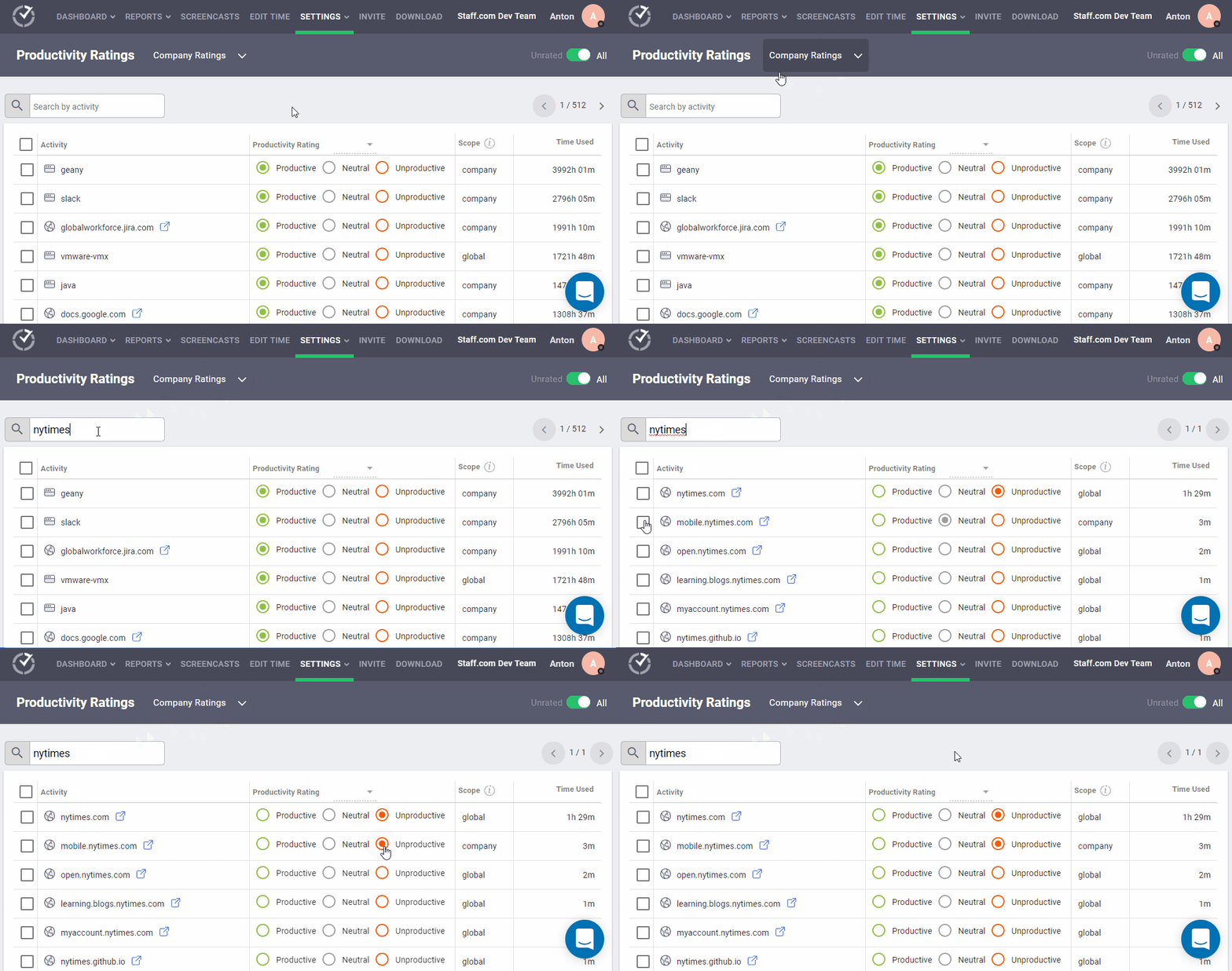
That’s why Time Doctor has a productivity ratings feature.
It lets admins choose which websites and apps they consider productive and unproductive. You can choose from four unique ratings:
- Productive
- Unproductive
- Neutral
- Unrated
Time Doctor’s productivity reports are based on these productivity ratings.
Looking for more ways to make your business more productive?
Check out this post on virtual assistant productivity.
C. Detailed reports
Time Doctor is the perfect tool for remote work. It doesn’t just track hours worked — it also gives you comprehensive activity reports.
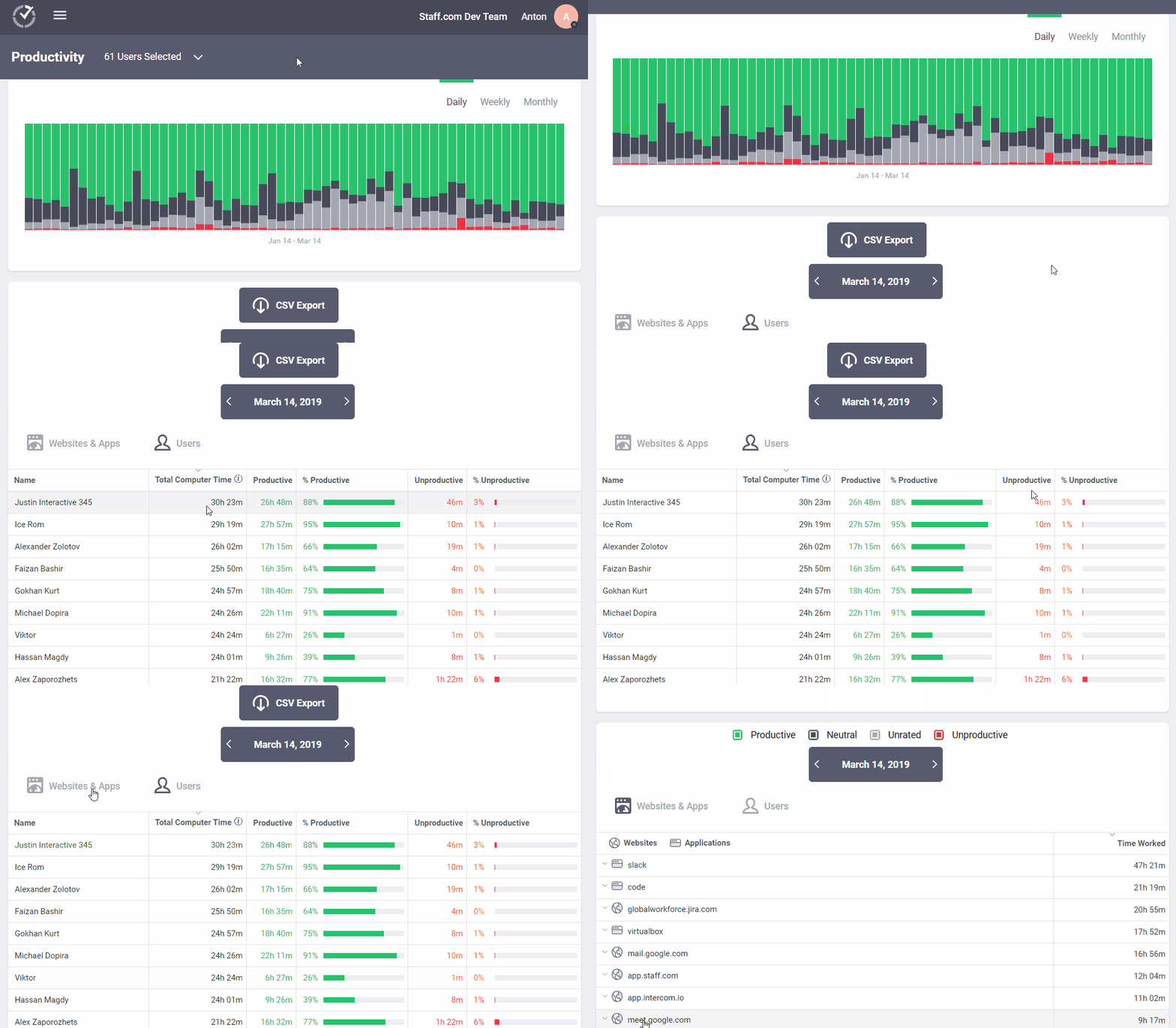
Some of the reports Time Doctor auto-generates for you include:
- Timeline report: Get a daily or weekly report that gives you insight into how much time each employee spends on their work and breaks.
- Activity summary report: Access active seconds and minutes, mobile use, unproductive behavior, and more.
- Attendance report: See which employees are absent, present, or late.
- Project and tasks report: See how long your employees take on any given task.
- Web and app usage report: View how much time your employees spend on different sites and apps while they’re working.
- Custom export: Create your own report with custom data to suit your business needs.
- Productivity report: View a detailed report on how productive or unproductive each remote employee is (based on Productivity Ratings).
D. Chrome extension
Time Doctor’s powerful Chrome extension lets you track time directly from leading project management tools like:
- Asana
- Jira
- Microsoft Office 365
- Google Apps
- Salesforce
- Trello
- And a whole lot more!
Additionally, the Chrome extension syncs with the desktop app in real-time, so time tracked will appear in your desktop app and Time Doctor web dashboard accurately.

E. Payroll management
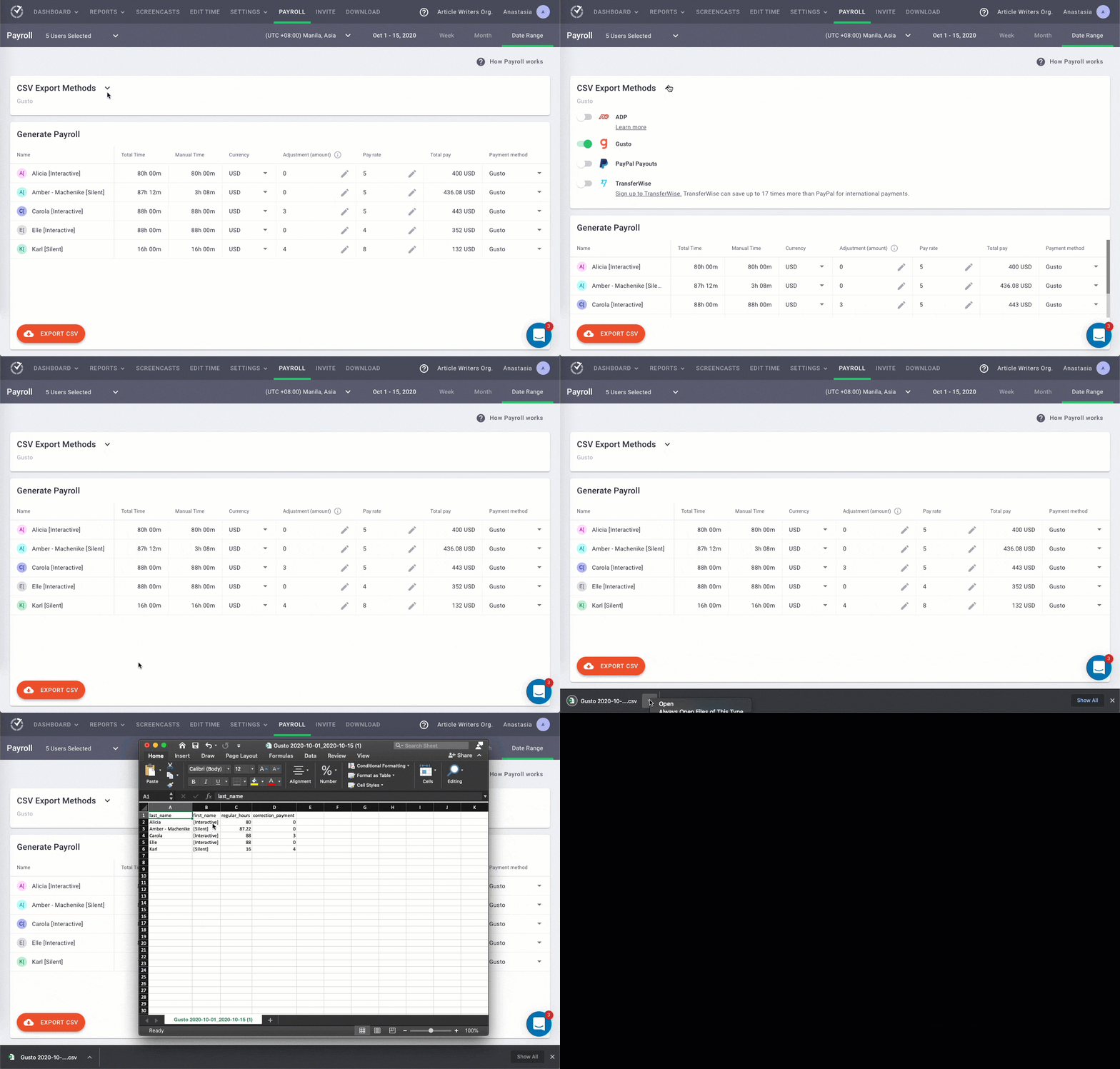
Time Doctor’s payroll feature calculates payroll for any user. You can pay your team according to hours worked or another model of your choice.
Here’s what else you can do with the payroll feature:
- Customize your payroll with pay periods and currencies.
- Automate timesheets and upload them for bulk billing.
- Set up payroll for salary or hourly employees.
- Automatically or manually approve timesheets.
- Integrate Time Doctor with Paypal and Payoneer for quick payments.
Note: The Payroll feature can only be enabled by the business owner.
F. Screencasts (optional)
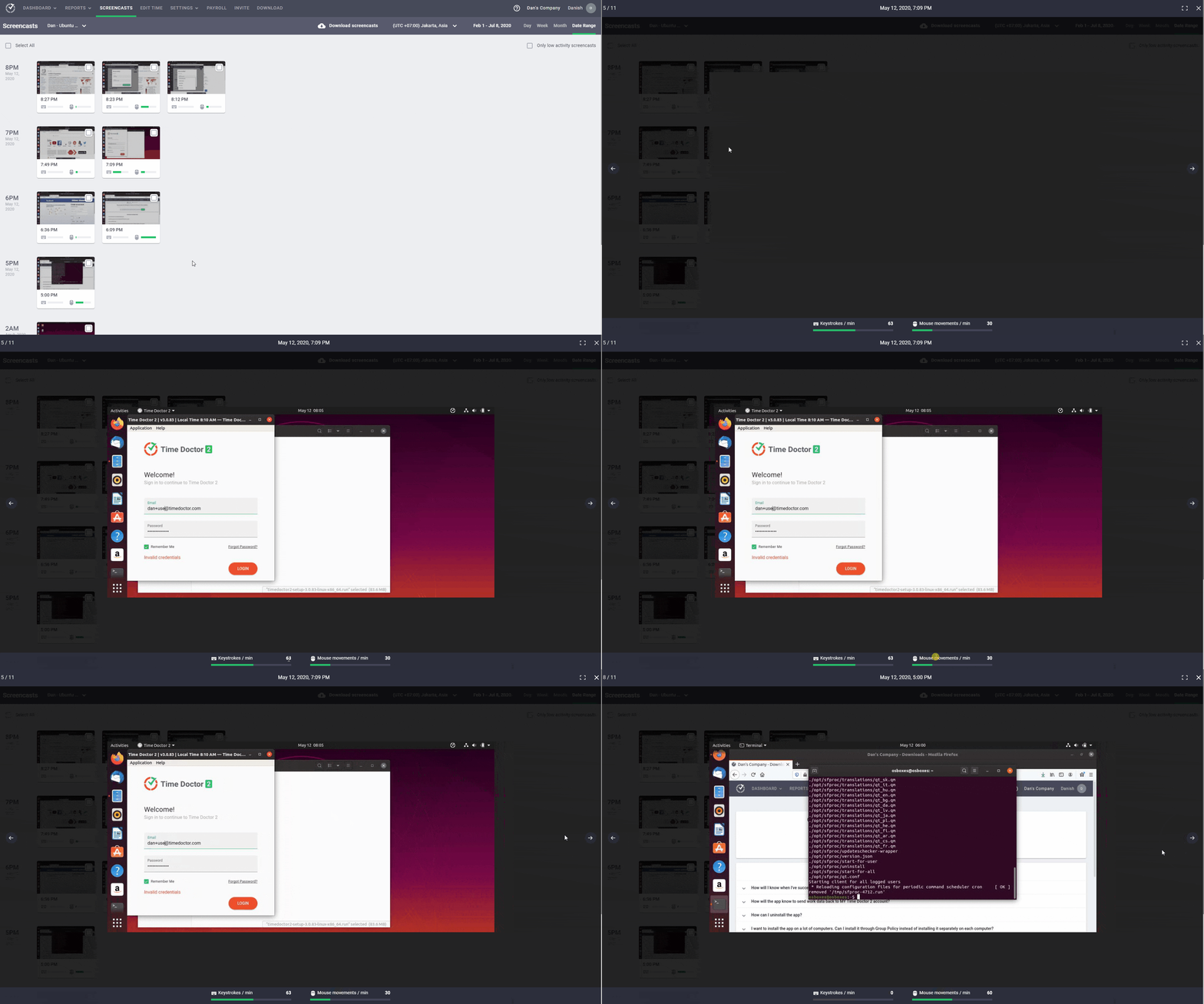
Time Doctor’s optional screencasts feature gives you even more insight into employee activity. Take screenshots or record videos of employees’ computer screens while they’re clocked in.
Managers can also:
- Set time intervals for screencasts.
- View screencasts with no or low keyboard/mouse activity.
- Download images and videos.
- Delete or blur screenshots with sensitive information.
Note: Time Doctor doesn’t track which keys were pressed. It only checks whether any keys were pressed or not.
Pros
- User-friendly interface.
- Employee-friendly settings.
- Create and assign projects to team members.
- Manual and automatic time tracking modes.
- Track employees’ idle time percentage.
- Track time without an internet connection.
- See all the pages a user visits within each website, not just the root domain.
- Strict privacy and data security policies.
- Track time across various project management software like ClickUp, Asana, and Wrike.
- Responsive customer service team.
Pricing
Time Doctor offers a free 14-day trial that doesn’t require a credit card. Paid plans start as low as $7/user per month.
Customer ratings
- G2: 4.4/5 (180+ reviews)
- Capterra: 4.5/5 (330+ reviews)
2. Slack for instant messaging

Slack is a channel-based messaging platform that lets team members collaborate effectively through swift communication.
Read how to use Slack as a time-tracking tool.
Key features
- Create specific channels for projects, individual topics, and teams.
- Keep every client and freelancer in the loop by adding them to a channel.
- Use Slack on your Android or iOS mobile device.
- Integrates with Office 365 and Google Hangouts.
- Built-in Slack calls to communicate complex ideas clearly.
Pricing
The pricing for this instant messaging tool starts at $8/user per month.
Customer ratings
- G2: 4.5/5 (26000+ reviews)
- Capterra: 4.7/5 (20000+ reviews)
3. Zoom for video conferencing

Zoom is a video conferencing tool that gives teams synchronous communication features. You can record your video call and audio calls to view later.
A major downside is that the unpaid version has a time limit of 40 minutes for calls, which can be a problem if you need to have long detailed meetings.
Want to know how to use Zoom? Check out this step-by-step guide.
Key features
- Host one-on-one meetings with up to 100 participants in the free plan.
- Use screen share so teams can see what everyone is doing.
- Join Zoom calls from any Google Android or Apple iOS device.
- Built-in recording and transcripts for future analysis.
- Team chats for one-on-ones and group discussions.
Pricing
Zoom has a free plan, and its paid plan starts at $149.90/ per license.
Customer ratings
- G2: 4.5/5 (26600+ reviews)
- Capterra: 4.6/5 (6800+ reviews)
4. Tandem for team collaboration

Tandem is a virtual desktop app that gives every remote workforce a “virtual office.” See what other team members are working on and join video chats to collaborate with one click.
Key features
- Collaborate with your team through a shared cursor for screen sharing.
- See which apps team members are using and join them.
- See which team members are online or available for feedback.
- Video and audio call for effective communication.
- Integrates with Asana, Google Docs, and Trello.
Pricing
This communication tool has a 14-day free trial, and its paid version starts at $20 for five users per month.
Customer ratings
- G2: N/A
- Capterra: N/A
5. Trello for project management

Trello is a project management tool that organizes your projects into boards, mimicking a physical office space. However, the software only has limited productivity tracking features, as it’s mostly centered around task management.
Read how to track task time in Trello.
Key features
- Manage projects by adding comments, attachments, and due dates to Trello cards.
- Built-in workflow automation to help teams be more productive in the remote office.
- Advanced checklists to help you manage project progress.
- Use keyboard shortcuts to save valuable time.
- Team Directory board to get to know your virtual team better.
Pricing
Trello offers a free version, and paid plans start at $12.50/user per month.
Customer ratings
- G2: 4.4/5 (11300+ reviews)
- Capterra: 4.5/5 (18900+ reviews)
6. DropBox Business for cloud storage

Dropbox Business is a cloud storage app that lets you save and share files in a secured online space.
Key features
- Store all your team’s documents in one centralized place.
- Create and edit your work in Dropbox to spend less time switching between apps.
- Personalized content suggestions to help you be more productive.
- Use the calendar integration to help you plan upcoming events.
- Access apps like Zoom and Slack without leaving Dropbox.
Pricing
Paid plans for this collaboration tool start at $15/user per month.
Customer ratings
- G2: 4.4/5 (11800+ reviews)
- Capterra: 4.5/5 (17500+ reviews)
7. Sococo for a virtual workplace

Sococo is a virtual co working space where hybrid and remote teams can come together to work in an office setting.
Like Wurkr and similar apps, Sococo provides a virtual reality office for your team to feel connected. Team members can get together around the digital coffee machine or bump into each other in the virtual working space as you would in a traditional office.
Key features
- Employees can work side-by-side in the same online office, regardless of their physical location.
- See who’s available for a chat and who’s busy, away, or not to be disturbed.
- Drop into your colleague’s virtual office for a meeting or random chat.
- Come together in a meeting room for collaboration.
Pricing
Plans start at $14.99/user per month (for a minimum of 10 users).
Customer ratings
- G2: 4.2/5 (30+ reviews)
- Capterra: 4.1/5 (10+ reviews)
8. Fond for employee engagement

Fond helps employers increase employee engagement by recognizing and rewarding employee milestones and accomplishments.
In a virtual office setting, fostering employee engagement and company culture can be difficult. But, Fond can help by helping make employees feel valued and invested in the organization.
Key features
- Foster a culture of engaged employees by publicly acknowledging your team’s achievements.
- Create service award catalogs for your employees to choose rewards.
- Track employee work anniversaries and offer them plaques and trophies.
- Get pre-negotiated corporate discounts for your whole team on fitness, travel, entertainment, etc.
- Choose from thousands of items, experiences, and rewards.
Pricing
Pricing available on request.
Customer reviews
- G2: 4.6/5 (1500+ reviews)
- Capterra: 4.6/5 (200+ reviews)
9. NordVPN For Online Security

NordVPN is a virtual private network service provider that protects your internet connection and data online. Using a VPN allows your virtual employees to log in to your office network from anywhere without compromising the security of your business network.
Key features
- Password manager for you to store, organize and access your passwords securely from anywhere.
- Sync your passwords across all your devices.
- Encrypt your files quickly and store them securely on your computer or in the cloud.
- Automatically backs up your data.
- Protects your data even if you access your online accounts on unprotected Wi-Fi.
Pricing
Plans start at $11.95/user per month.
Customer ratings
- G2: 4.5/5 (190+ reviews)
- Capterra: 4.6/5 (670+ reviews)
10. Calm for mental wellness

Calm is a mental health app with exercises, helpful breathing techniques, and sleep stories narrated by celebrities.
It can help remote employees reduce stress and anxiety. This is useful because establishing a work-life balance can be especially challenging for employees who work from home.
Key features
- Nature sights and sounds help employees relax while working.
- Personalized mindfulness experience based on your needs.
- Offers audio classes taught by mindfulness experts.
- Video lessons on mindful movement and gentle stretching.
- Different music depending on whether you want to relax, focus on work, sleep, etc.
Pricing
Paid plans start at $49.99/user (billed annually.)
Customer reviews
- G2: N/A
- Capterra: N/A
Final thoughts
While you could try to manage your virtual team without using virtual office software, how long would your team actually be productive?
Not long.
The virtual office software covered here represents a wide and diverse range of what you can use for an online office. After reviewing our list of the best virtual office software, you’ll have a better idea of exactly what your remote team needs.

