
A number of visitors to the site have asked how Time Doctor is different compared to RescueTime, a popular employee monitoring and time tracking software solution. On the surface, both programs appear to be similar, but each product’s approach and practical applications are vastly different.
Both rely on software systems to monitor activity, track productivity, and generate reports. But this is where the similarities begin and end.
In this article, we’ll explore the main differences between Time Doctor vs RescueTime. We’ll cover each employee time tracking software in detail, including their key features and pricing plans.
Let’s get started.
What is Time Doctor?

Time Doctor is a project management and employee time tracking software. It’s used by large companies like Verizon and small businesses like Thrive Market to boost employee time management and productivity.
Here are some of its robust features:
- Tracking employee work hours with manual and automatic time tracking on mobile and desktop apps – eliminating the need for a manual timesheet.
- Improving work productivity with idle time pop-up alerts.
- Generating comprehensive employee productivity reports for performance analysis.
- Summarizing the time spent on multiple projects, tasks, and clients per employee.
- Streamlining employee payments with integrations like ADP, Wise, etc., for billable hours and business-related expense tracking.
- Analyzing employee work hours to identify work-life balance issues or burnout.
These features make this time tracker tool useful for all kinds of teams, including those with remote work. Its benefits help freelancers and teams get more work done during each work hour.
Additionally, it has various Chrome integrations, like Asana, Trello, Microsoft To Do, Zoho Projects, and Google Calendar to improve work productivity.
Now, let’s take a look at what RescueTime has to offer.
What is RescueTime?

RescueTime is an employee monitoring and time tracking software that offers insights on how users spend their time. It’s ideal for remote working teams or freelancers.
Its key features include:
- Capturing time data automatically without the need for manual time entries.
- Monitoring user activity to prevent idle time tracking.
- Tracking time from the mobile app and desktop app.
- Monitoring time spent on websites and apps.
- Minimizing distractions and setting goals via its FocusTime feature.
- Integrating with apps like Google Calendar, Slack, Github, and Zapier.
Check out this detailed RescueTime Review to learn more about the tool.
Read on to see how these time tracking tools compare in pricing.
Pricing and free trials
Time Doctor has multiple paid plan options with different offerings to suit various large and small businesses:
- Basic plan: Costs $7/user per month and offers features like time tracking, task and project management, and activity tracking.
- Standard plan: Costs $10/user per month, offering basic features plus website and app tracking, payroll, integrations, and email notifications.
- Premium plan: Costs $20/user per month, offering basic and standard features along with internet connectivity reports, client login access, concierge account setup, and more.
These paid plans come with a 14-days free trial that doesn’t require any credit card information.
On the other hand, RescueTime offers a paid plan that costs $12/user per month. It comes with a two-week trial period. It also has a free plan for individuals who need a basic time tracker.
So, which one should you use and why?
6 key reasons why Time Doctor is better for teams than RescueTime
Here’s a comparison of certain features to help you decide which productivity tracking app is most suitable for business use:
1. Manual and automatic time tracking
Time tracking solutions may use different time tracking features that offer distinct functionalities.
A. Time Doctor
Time Doctor offers manual tracking that lets users manage their priorities and track time spent on each task. For maximum ease of use, it also has an option for automatic time tracking (the silent app).
If employees want more control and flexibility over tracking their work time, they can use the interactive/manual mode. The interactive app is user-friendly, letting users start and stop the timer whenever they start work, take a break, and get done – all with just one button!
The silent app has no user interface and runs silently in the background. It has a low impact on employee workflows, letting users focus on their daily work without interfering for maximum productivity.
Managers can configure the app to run during specific hours.

B. RescueTime
RescueTime works as a silent or automatic time tracking software. It runs in the background and requires no effort to use once installed.
But there’s also a major drawback in the categorization of tracking time for the work done. A friend of mine who uses Time Doctor wrote to me after trying RescueTime for the first time last week, saying, “It counts the time when I visited my bank website on my break as ‘very productive,’ but time in Google Chrome as ‘very distracting,’ when I was actually working!”

2. Employee productivity management
Managing and improving employee productivity is a vital requirement for any time tracking software. But some productivity tracking apps offer better time tracking features for workflow management than others.
A. Time Doctor
Time Doctor is a wonderful example of how a time tracker can boost work performance for even remote teams. Its idle time tracking and pop-up notification help employees maintain task productivity.
The time management software tracks idle seconds and minutes, which are periods without any keyboard or mouse activity.
Moreover, managers can set idle time limits, beyond which the tool automatically stops tracking time and displays a pop-up that verifies whether the employee is still working.
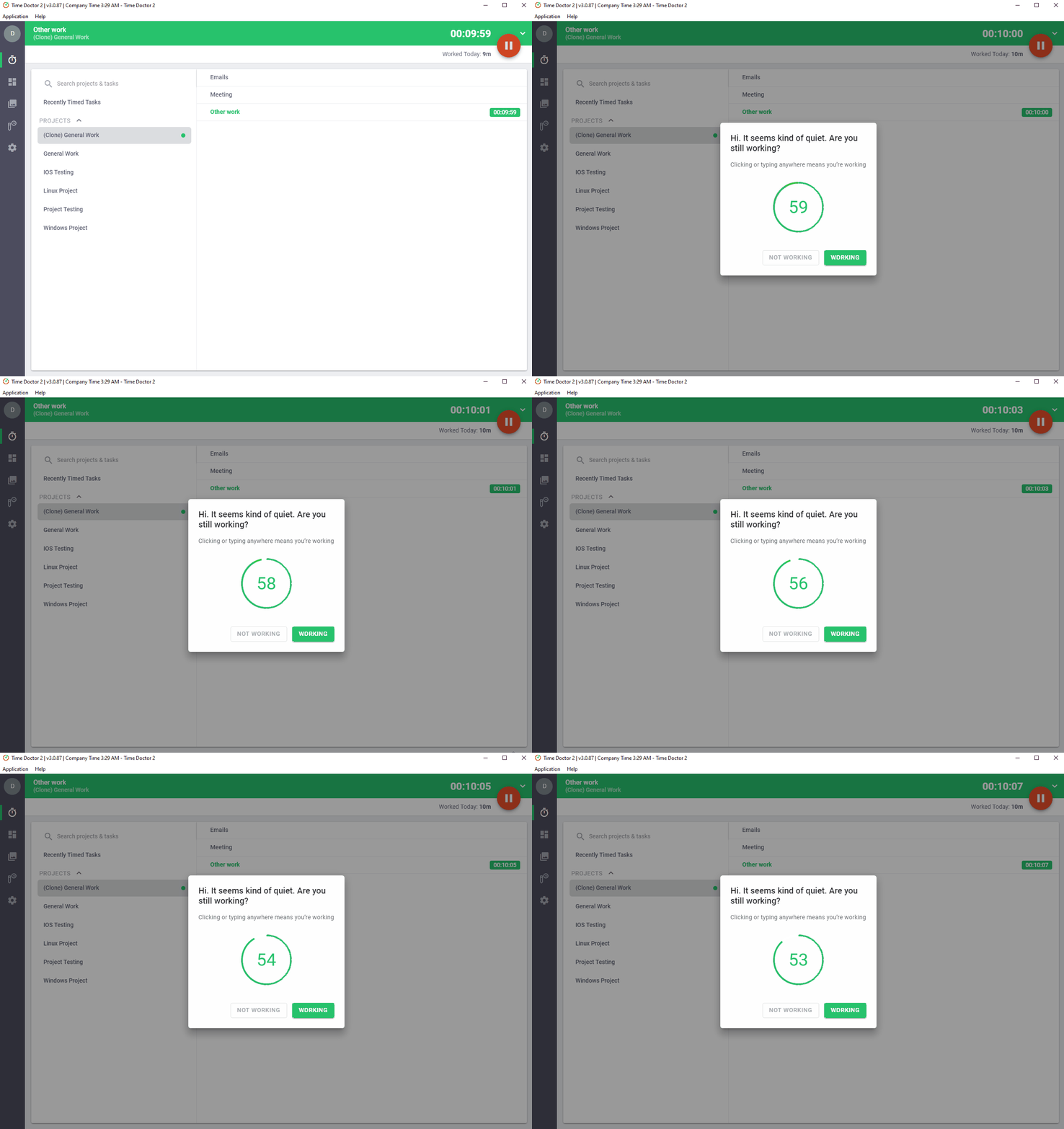
Note: Time Doctor is not a keystroke logger. It solely tracks if any keys were pressed and doesn’t record keystrokes or mouse clicks.
B. RescueTime
The app’s RescueTime Alerts (not available in the free version) help reduce distractions and increase employee productivity. Users can set up alerts to notify themselves of distracting or productive time.
For example, the app will send a pop-up message when you’ve spent more than an hour of distracting time or more than three hours of productive time.
But the app itself has no direct features to prevent drops in work productivity.

3. Screencasts
Here is what these apps offer in terms of screenshots:
A. Time Doctor
Time Doctor has an optional screen monitoring feature to capture visual time data that managers can download and view. If a Time Doctor user says they’re working on something and their screen captures reveal something different, they’ll be quickly caught.
While monitoring a worker’s screen may sound intrusive, it’s important to remember that Time Doctor will only collect screen capture information during “work time,” not when workers are on a “break” or not working.
Time Doctor strongly believes that business owners and managers have a right to know what their workers are doing during each working hour, but not on their personal time.
We have found that if people know that they’re being monitored during their working hours, they usually don’t get sidetracked.
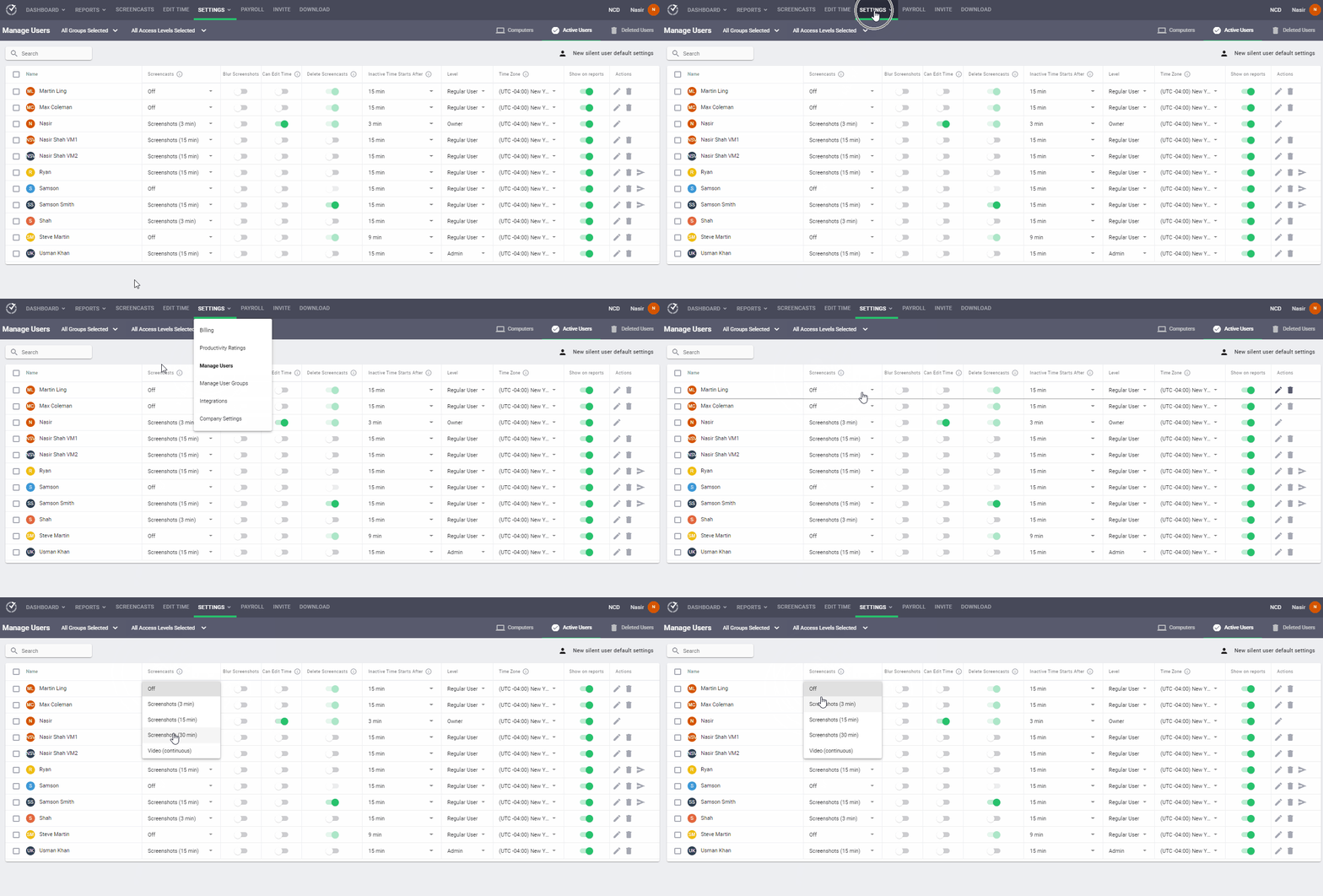
Note: Managers and employees can delete or blur screenshots containing personal or sensitive information to protect employee privacy.
B. RescueTime
RescueTime doesn’t provide screenshots of work performed while tracking time. It only records web activity data to verify time use.
4. Productivity ratings
Here’s what these two apps offer for productivity scoring:
A. Time Doctor
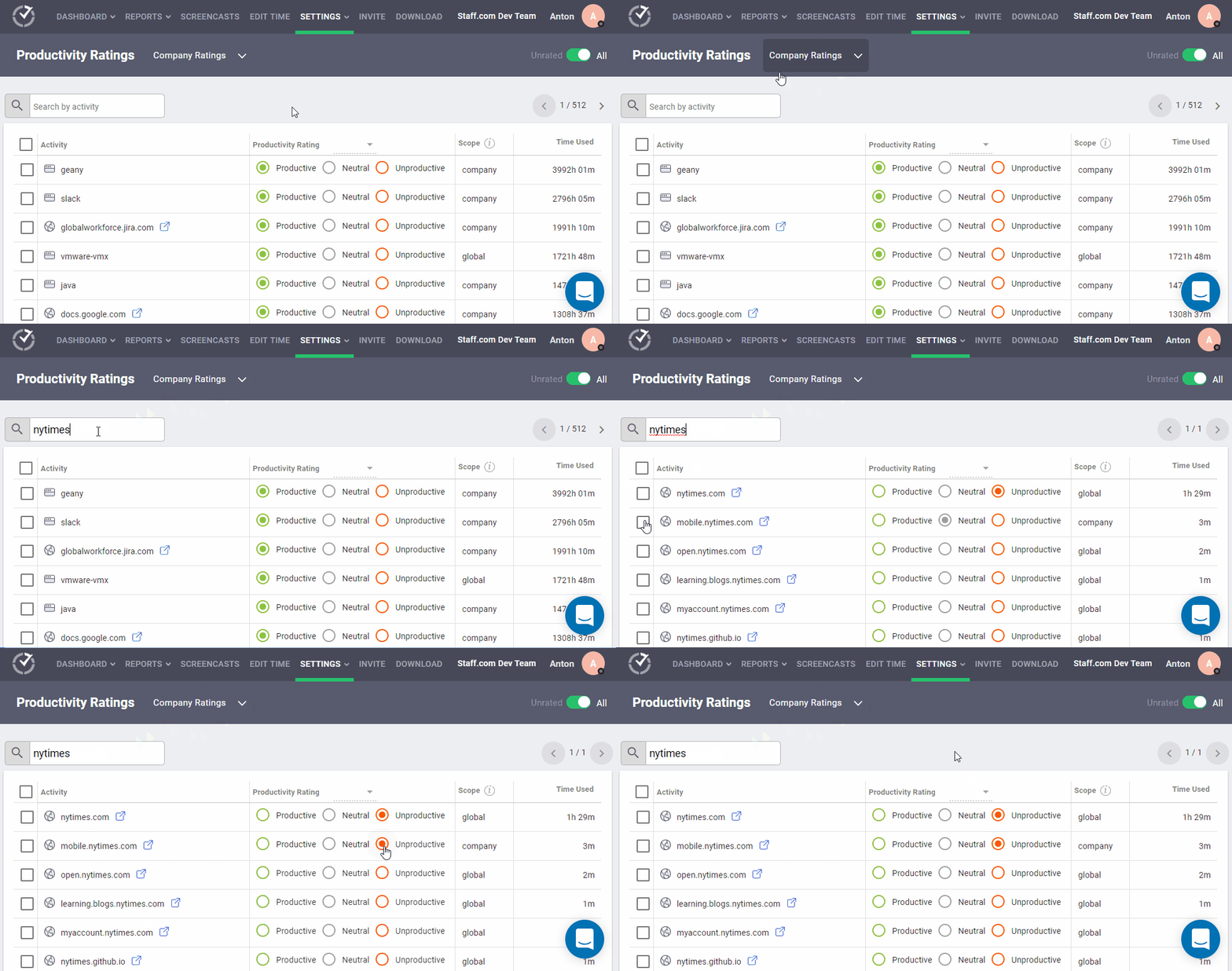
Time Doctor allows managers to assign productivity ratings such as productive, unproductive, neutral, and unrated to websites and applications.
These ratings help classify whether employee time use is productive or unproductive.
How does this work?
Time Doctor has a knowledge base of global ratings for specific websites and apps. For example, the global rating for Meta is unproductive, while Microsoft Excel is productive. And less popular apps may be rated as neutral or unrated.
On that note, Time Doctor doesn’t block access to distracting websites. Instead, it tracks the usage as “poor time use” for websites like Meta or Twitter. It then sends this information to managers in a weekly report.
However, an admin can customize and adjust these ratings for specific teams (even remote teams) or the whole company based on their work profiles and requirements.
For example, although Meta is globally considered unproductive, it’ll be productive for a social media team.
B. RescueTime
RescueTime has a FocusTime feature that allows users to block certain websites and apps. It also puts the responsibility of assigning productivity ratings to each individual.
So, RescueTime doesn’t accurately estimate whether each team member’s time use is productive or unproductive during the workday.
Additionally, blocking websites sometimes leads to browser conflicts, problems with firewalls, spyware alerts, and other issues – which create time tracking inconsistencies.

5. Project and task management
Here’s how the two apps differ in their approach to project tracking and budgeting:
A. Time Doctor
Time Doctor is the best time tracking software for project and task management. The software is super accurate at tracking work time since it asks users to specify the tasks and projects they’re undertaking. Managers can also access this project tracking data in various reports generated by the app.
So, companies can use it to easily generate a timesheet and invoice for billable hours.
This approach, based on fundamental time management principles, asks users to enter their most critical daily priorities and work on them one task at a time.
As employees select each task, the tool tracks time worked for that particular task. Moreover, Time Doctor prompts users to assign a client or project to specific tasks before they begin tracking time.

B. RescueTime
RescueTime doesn’t accurately track time against specific tasks or projects. Instead, it categorizes tracked time as per applications or websites used in a workday or week.
This information is limited since you cannot know what someone is working on from what applications they’re using.
For example, RescueTime can track if a person was working on a Word document, but this information can’t tell you the actual task they were completing.
So, even though RescueTime has eye-catching graphs displaying the time utilized in different applications, the usefulness of the data is limited.
And although RescueTime has some project management tools and functionalities, its features don’t track working hours for multiple projects or clients.

6. Comprehensive productivity reports
Here are the types of detailed reports generated by both apps:
A. Time Doctor
Time Doctor’s time management software generates several productivity reports that offer real-time insights into how employees can improve work productivity.
One example is the Activity Summary report which displays the active minutes, manual time, and unproductive time for each employee over a selected period. This detailed report allows managers to assess productivity levels and resolve performance hiccups.
Other detailed reports available include:
- Hours tracked report: Displays the total hours tracked by employees over specific date ranges.
- Projects & tasks report: Presents data for time spent on projects and individual tasks by each employee.
- Attendance report: Shows real-time information about when an employee is present, absent, partially absent, or late.
- Timeline report: Displays each team member’s time spent on tasks and breaks in a day or week.
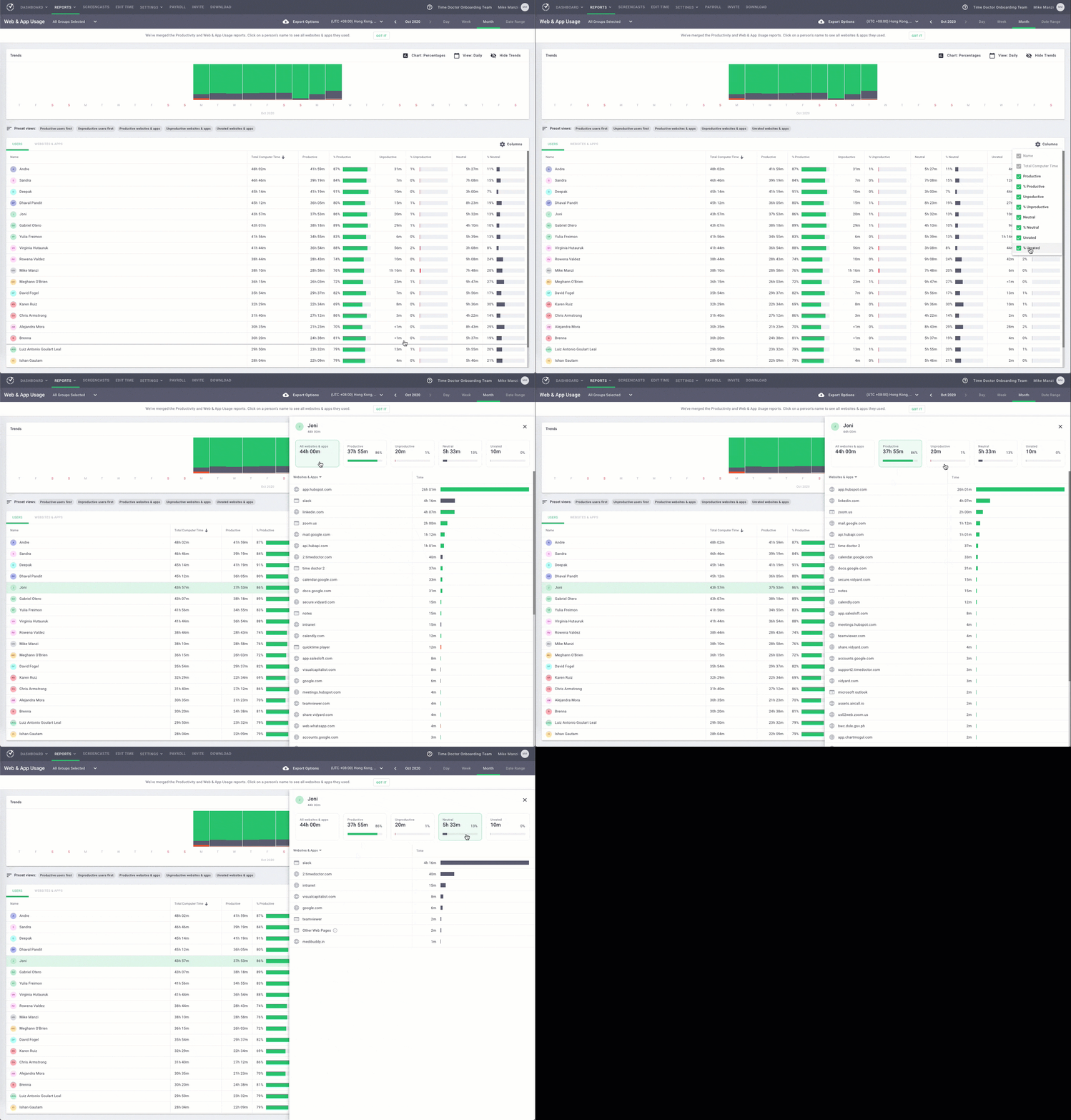
- Web & app usage report: Captures the time spent by an employee on every app and website used during each work hour.
B. RescueTime
RescueTime provides individual and team reports that help managers assess the productivity standards of employees. These reports offer basic information on where team members spend their time.
Some of these reports include:
- Daily highlights report: Provides a log of all activities registered throughout a workday.
- Productivity report: Details how an employee spent their work time during a specific period with different productivity rankings.
- Applications & websites report: Presents time data on the most-used apps and websites within a specific time frame.
Unfortunately, these reports don’t offer insights into how employees can improve productivity. It also doesn’t have reports or features for employee leave tracking.

Related Post: See how the Time Doctor tracking tool compares with other popular tools, like Toggl Track and Hubstaff.
Wrapping up
Time Doctor is the best time tracking software with added features for businesses or managers who want to improve their team’s performance and productivity.
RescueTime is a good tracking tool just for employee monitoring – to know how much time they spend using particular apps or websites.
So to summarize, the major benefit of using Time Doctor over Rescue Time is that managers can accurately measure employee productivity during work hours. It allows for tracking employee tasks, rather than just the applications used or websites visited.
To help you decide which software solution is better for your business, please refer to the comparison chart below or just download and try the time tracking tools.
Time Doctor vs RescueTime: Features Overview
Here’s an overview of Time Doctor vs RescueTime:
| Feature | Time Doctor | Rescue Time |
| Tracks time spent away from a computer (offline time tracking) | YES, and allows you to enter the task you were working on | YES |
| Ability to track time for projects | YES, with detailed time data for each user and project | YES, but challenging to get accurate data |
| Team time tracking | YES, with a detailed team dashboard | YES, but doesn’t track tasks* |
| Graphs that show websites and apps used during the day | YES, with customizable productivity ratings for each website and app | YES |
| Option for blocking distracting websites | NO, but we recommend only monitoring | YES, when activating a focus session |
| Records break times accurately | YES | NO, users can only schedule breaks |
| Nudge team members when they are distracted | YES, with an option to time out due to inactivity | YES |
| Silent time tracking solution (no data entry required) | YES, it starts tracking employee time when they log onto their computer | YES |
| Integrates with Basecamp and JIRA | YES | NO |
| Available for MAC | YES | YES |
| Available for Windows | YES | YES |
| Available for Linux | YES, for Ubuntu 16.04 LTS and above | NO |
| Available for iPhone/ iPad (iOS) | NO | YES |
| Available for Android | YES, with separate reports for mobile time tracking | YES |
| Time tracking is accurate enough to pay someone based on hours in the software | YES | NO |
| 24/7 Customer Support | YES | NO |
| Tracks time spent on separate tasks | YES, with detailed time data on each task per team member | NO |
| Tracks specifically “poor time use websites” and emails a report to you or your manager | YES, with customizable classifications for unproductive websites | NO, the app doesn’t classify websites as productive or unproductive |
| Optional screen captures of team computers available for download by managers | YES, with activity levels shown under each screenshot | NO |
| Ability to see what your team is working on and who is online | YES | NO |
| Simple daily reports with a list of time spent on each task and top priorities for the next day | YES | NO |
| Allows you to organize and prioritize your most important tasks | YES | NO |
| Can manually add hours | YES, the tool also provides screenshots to verify activity levels | YES, but it needs to be added via the offline time tracking feature |
| Can report absenteeism/ sick days and leave | YES | NO |
| Nudges for periods of inactive keyboard use | YES | NO |

